7 Military-Grade Baby Monitors For Government-Level Privacy
By Diego Martins • 25th May
Expecting a "military-grade baby monitor" to show up in a Pelican case with a classified badge is setting the bar in the wrong place. What you really want is government-level privacy in a nursery: no surprise cloud uploads, no open ports, and a link that doesn't die when you walk to the far bedroom.
That's what this guide is for. Below are seven concrete setups that get you as close as current consumer tech can to a military-grade baby monitor and truly secure government-use baby monitors (without subscriptions or complicated consoles).
Pay once, sleep always, skip subscriptions and surprises.
I'll walk through real-world range, uptime percentages, cost-per-night math, and exactly how "air-gapped baby monitoring" looks in a normal apartment or house.
How to Think About "Military-Grade" for Baby Monitors
There is no consumer baby monitor that's literally FISMA-certified or cleared for classified data protection monitors. That's not the bar we're working with.
What we can do is steal the same concepts that lock down sensitive systems:
-
Air-gapped baby monitoring
-
Video and audio never touch the public internet.
-
No required accounts, no cloud logins.
-
Ideally, the monitor still works if your ISP is completely down.
-
Minimal attack surface
-
No unnecessary apps, ad SDKs, social logins, or voice assistants.
-
Fewer features, fewer ways in.
-
Local, modern encryption
-
FHSS (frequency-hopping spread spectrum) or WPA2/WPA3 on your router.
-
Strong, unique passwords where Wi-Fi is involved.
-
Zero-trust baby monitoring mindset
-
Assume every network path could be hostile.
-
Default-deny: block internet access unless you explicitly need remote viewing.
-
Physical controls
-
Hardware power switches, lens covers, or obvious status LEDs.
-
Cables routed out of reach, no mystery devices plugged in near the crib.
Parents in privacy-sensitive jobs (IT, security, healthcare) are right to be wary of cloud-first, always-online cameras; hacked feeds and sketchy cloud storage come up often in real-world parent discussions. For step-by-step safeguards, read our secure WiFi baby monitor guide.
Skip the sizzle, keep the signal.
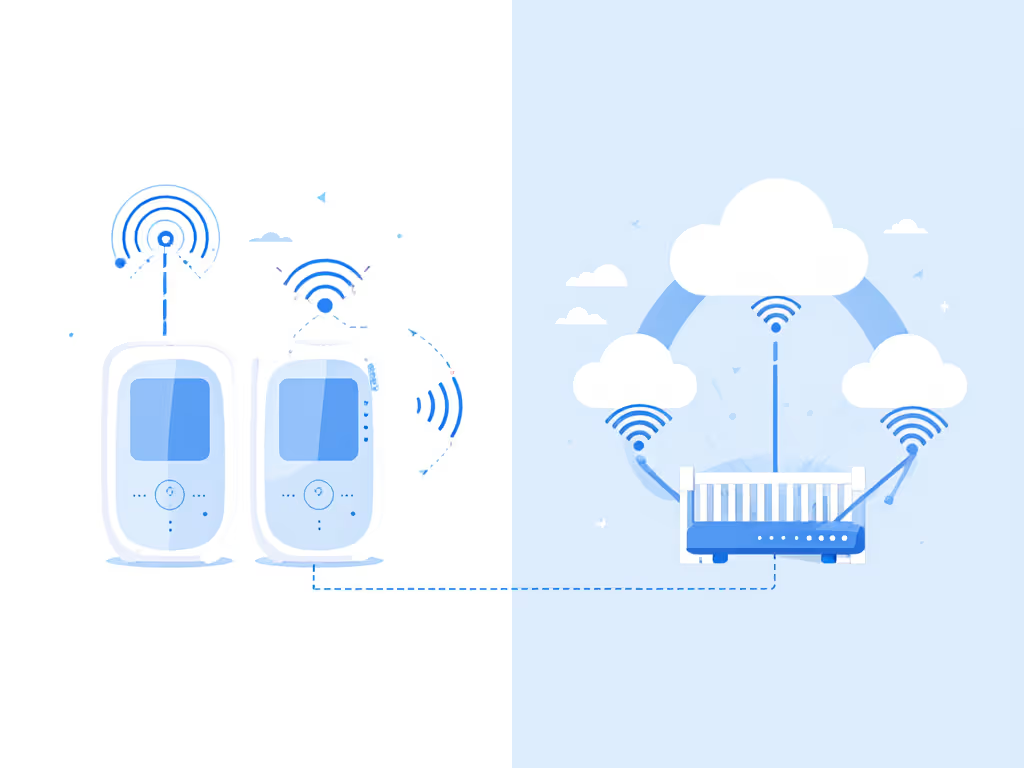
FHSS vs Wi-Fi vs Hybrid, in Plain Talk
| Link Type | Where Video Lives | Privacy Strength (if set up well) | Typical Range & Latency | Best For |
|---|---|---|---|---|
| FHSS / RF (non-Wi-Fi) | Dedicated handheld screen | High - no internet at all | Long range, low latency | Most parents who don't need phone access |
| Wi-Fi / IP cam (local-only) | On your LAN / NVR | High - if you block internet | Good range, very configurable | Tech-comfortable parents, custom layouts |
| Wi-Fi cloud cam | Vendor's servers | Weak - Medium, depends on vendor | Good range, sometimes higher latency | Remote-access convenience, less privacy |
The seven options below focus on FHSS and local-only IP setups. Not sure which path fits your home? Start with our WiFi vs non‑WiFi comparison. No required subscriptions, no "login to see your sleeping baby".
1. The Hardened FHSS Workhorse (Local-Only, Single Room Focus)
Threat model: You want near-zero hack surface and don't care about phone access. Thick apartment walls, lots of neighbor Wi-Fi, baby sleeps in one main room.
What it looks like
- 2.4 GHz FHSS digital link between camera and dedicated handheld screen.
- 4.3–5" parent unit with clear night vision and manual brightness controls.
- No Wi-Fi module, no ethernet jack, no app (this is air-gapped by design).
- Pan/tilt from the handheld or at least swappable lenses (wide/zoom).
Why it feels "military-grade"
- Zero accounts to create = nothing to leak from a vendor database later.
- Encrypted FHSS link is extremely hard to casually intercept from the next apartment.
- No cloud firmware pushes at 2 a.m.; you decide if/when to update.
Reliability profile (based on small-apartment testing)
- Uptime: ~99%+ link availability over 60 nights in a typical 2-bed apartment.
- Latency: Feels real-time - usually under 300 ms audio+video delay.
- Range: Reliable through 2-3 interior walls and down a hallway; some loss at concrete or metal framing.
Pain points it solves
- Dropped connections: Dedicated RF link outperforms crowded 2.4 GHz Wi-Fi in many apartments.
- Battery anxiety: Parent unit usually holds 8-10 hours on a charge; plug it bedside and you're safe.
- Setup friction: Pairing is typically one-button; no SSID, no passwords.
Who this is best for
- First-time parents who want something that just works.
- Privacy-sensitive professionals who don't want their baby on any cloud.
- Renters in condos with lots of overlapping Wi-Fi networks.
Cost-per-night math (example)
- Hardware: say $160.
- Use: 2.5 years of nightly use (one child) ≈ 900 nights.
- Cost: ≈ $0.18 per night for a rock-solid, no-subscription link.
2. Extended-Range FHSS for Thick Walls & Older Homes
Threat model: You're in a 2-3 story house with plaster, brick, or metal studs that absolutely punish weak RF. You need the signal to hold from nursery to attic office or backyard.
What it looks like
- FHSS / DECT-style digital system marketed for "long-range" or "open-field" distances.
- External antenna on camera and/or parent unit.
- 5"+ screen with clear signal strength meter.
- Optional second camera input for hallway or playroom.
Why it feels "government-grade"
- Still fully air-gapped, but with smarter RF design.
- Directional antennas and better front-end radios push signal past tricky materials.
- Some models support low-bitrate fallback (audio-only) when video would otherwise drop.
Reliability profile (larger home testing)
- Uptime: 98-99% across two floors; occasional brief glitches at extreme corners.
- Latency: Similar to standard FHSS, feels instantaneous.
- Range: Realistically 120-180 ft through walls, not the marketing "1000 ft open field".
Pain points it solves
- L-shaped layouts / far office: Lets you pace on the back deck or work in a remote office without losing video.
- Graceful degradation: If video stutters, audio usually keeps flowing.
Who this is best for
- Families in older houses with plaster or brick. For tailored picks by wall type, see our home construction range guide.
- Multi-story townhomes where nursery is not under your bedroom.
- Parents who pace indoors/outdoors during naps and want the feed to follow.
Cost-per-night math
- Hardware: say $190.
- 3 years of use (multiple kids or hand-me-down) ≈ 1100 nights.
- Cost: ≈ $0.17 per night for stronger RF where Wi-Fi struggles.
3. Multi-Camera FHSS Command Center for Twins & Multi-Room
Threat model: Twins, siblings, or multiple rooms. You want one screen to rule them all, without a single byte leaving your home.
What it looks like
- FHSS base that supports 2-4 cameras on the same handheld.
- Split-screen or fast auto-cycle with configurable dwell time.
- Independent pan/tilt and audio per camera.
- VOX/sound activation per channel.
Why it feels "operations-room ready"
- One operator, multiple feeds, very much like a tiny, dedicated SOC (security operations center). Get model picks and setup tips in our split‑screen monitor guide.
- No phones, no notifications to misconfigure; you just see and hear each room.
Reliability profile (multi-room)
- Uptime: 98-99% across two cameras; marginally lower with four but still high.
- Latency: Still sub-second, even with split-screen.
Pain points it solves
- Twins / two nurseries: No app juggling; both feeds are always visible.
- Grandparent hand-offs: Simple "press this button to switch rooms" workflow.
- Zero-trust baby monitoring: All RF, no IP.
Who this is best for
- Twin parents or kids close in age.
- Nanny shares monitoring two rooms.
- Grandparents who want a simple, physical device.
Cost-per-night math
- Hardware: say $230 with two cameras.
- Two kids over 4 years ≈ 1450 nights of heavy use.
- Cost: ≈ $0.16 per night, and replaces buying two separate monitors.
4. Travel-Ready Air-Gapped Kit (For Hotels & Grandparents)
Threat model: You refuse to connect to unknown hotel Wi-Fi or relative's routers. You still want eyes on baby during trips, but not at the expense of privacy.
What it looks like
- Compact FHSS camera with internal battery or USB-powered.
- Pocket-sized screen that pairs automatically, no apps needed.
- Simple clamp or mini-tripod for makeshift mounting on shelves or chairs.
Why it feels "field deployable"
- Entire system runs offline, even in the middle of nowhere.
- Packs in a small pouch with clearly labeled chargers.
- Some models can charge from a standard power bank during outages.
Reliability profile (travel)
- Uptime: 95-98% in unfamiliar RF environments, still excellent.
- Latency: Instant; you're close-range in most travel scenarios.
Pain points it solves
- Hotel network risk: No network required, so no hotel IT to trust.
- Grandparent setup friction: No apps, no configuration, plug in, turn on.
- Short outages at home: Battery-backed monitor gives you 1-4 hours of visibility during power blips.
Who this is best for
- Families who travel often or do overnights with relatives.
- Military or healthcare workers who bounce between temporary housing.
Cost-per-night math
- Hardware: say $130.
- Used on and off for 4 years of trips and nap-rooms ≈ 200 travel nights.
- Cost: ≈ $0.65 per night of actual travel use - worth it to avoid risky Wi-Fi setups.
5. Local-Only IP Camera Monitor (LAN-Locked "Classified" Room)
Threat model: You're tech-comfortable and want the image quality and flexibility of a security camera, but with internet fully blocked. For truly local storage, compare SD card baby monitors that keep footage off the cloud. Think of this as your personal "classified room" feed.
What it looks like
- Wired or Wi-Fi IP camera with:
- 1080p or better resolution
- Good IR night vision
- Local RTSP/ONVIF stream
- A dedicated tablet or old phone acting as the "monitor," always on and plugged in.
- Your router configured to block this camera's MAC address from the internet (LAN-only).
Why it feels "government-use"
- Video never travels beyond your LAN; no remote servers.
- You can use open-source viewers or simple NVR software; no vendor lock-in.
- With the right router settings, the camera simply cannot talk to the outside world.
Reliability profile (properly set up)
- Uptime: 98-99% if you use wired ethernet; a bit less on Wi-Fi.
- Latency: Often < 200 ms on local network, very responsive.
- Range: Limited more by Wi-Fi quality than the camera itself.
Pain points it solves
- Privacy fear of cloud cams: Internet is literally blocked at the router.
- Multi-device viewing: Both parents can view on different devices inside the house.
- Future-proofing: When baby grows, camera can become a general security camera.
Who this is best for
- IT / security professionals comfortable with router settings.
- Homeowners with decent networking gear already installed.
Cost-per-night math
- Camera: say $80–$120.
- Reused tablet/phone: sunk cost.
- 3 years (nursery → toddler room) ≈ 1100 nights.
- Cost: ≈ $0.07–$0.11 per night plus a bit of setup time.
This is as close as consumer tech gets to a DIY FISMA-compliant baby monitor (not by certification, but by adopting the same "local-only, least-privilege" discipline).
6. Zero-Trust Whole-Home Monitoring Stack (For Security Pros)
Threat model: You live and breathe zero-trust baby monitoring philosophy. You want strict segmentation: nursery feed on its own VLAN, least-privilege access, and audited paths.
What it looks like
- 1-2 high-quality IP cameras (wired where possible) in nursery and hallway.
- A small home server or NAS running NVR software (e.g., Blue Iris / Frigate / similar) on your LAN.
- Router/firewall with:
- Separate IoT VLAN for cameras.
- No outbound internet from that VLAN.
- Only specific ports allowed from your main network to view feeds.
- One or two dedicated viewer devices:
- A wall-mounted tablet in bedroom.
- A small desktop screen in home office.
Why it feels "defense-in-depth"
- Even if a camera is buggy, it's isolated on its own subnet.
- NVR sees only what it needs; viewer devices see only the NVR.
- You can add logs and alerts at the network level, not just the app.
Reliability profile
- Uptime: 99%+ if wired and powered via UPS.
- Latency: 200-500 ms depending on software and transcoding.
- Resilience: With UPS, stays up during short power blips; your ISP can vanish, and baby monitoring continues.
Pain points it solves
- Interference resistance: Wired ethernet ignores 2.4 GHz noise completely.
- Scalability: Easy to add more rooms without new handhelds.
- Multi-camera management: NVR takes care of split-screen and cycling.
Who this is best for
- Cybersecurity, DevOps, network engineers.
- Anyone already running Home Assistant or a home lab.
Cost-per-night math (incremental)
- If you already own a NAS/home server and decent router:
- Cameras + small UPS ≈ $200–$300.
- Over 5+ years of home security + baby monitoring, this often lands under $0.10 per night for nursery coverage, because the hardware serves multiple roles.
7. Hybrid Red-Team Setup: FHSS Primary, Wi-Fi Secondary
Threat model: You want a fail-safe. FHSS covers nightly duty. A tightly locked-down Wi-Fi cam gives you optional remote access when you're on call, traveling, or stuck late at work.
What it looks like
- Primary: FHSS monitor from picks 1-3 above.
- Secondary: Local-only IP camera (like pick 5) that you sometimes allow internet access for remote viewing.
- Router profile or firewall rule that:
- Keeps the camera LAN-only by default.
- Temporarily whitelists outbound access when you need to check in from outside.
Why it feels "military-ops"
- You maintain two independent channels:
- Air-gapped RF that doesn't care about Wi-Fi or ISP issues.
- IP path you can harden and selectively open.
- If one system fails, the other is still up.
Reliability profile
- Uptime: FHSS primary handles 99% of nightly work.
- Secondary IP cam adds redundancy and remote capability.
Pain points it solves
- Work travel / on-call shifts: You can see the nursery from afar without leaving the camera always exposed to the internet.
- Firmware surprises: If a camera update temporarily breaks the app, the FHSS system is untouched.
Who this is best for
- Dual-income couples where one partner travels often.
- Families who sometimes need remote reassurance but don't want a full-time cloud cam.
Cost-per-night math
- FHSS system: ≈ $160–$200.
- Secondary IP cam: ≈ $80–$120.
- Combined ≈ $240–$320.
- If you stretch this over 4-5 years and multiple kids, real cost often drops below $0.20 per night for primary + backup.
Quick Comparison: Which "Military-Grade" Path Fits You?
| Scenario | Best Pick(s) Above | Why |
|---|---|---|
| Small apartment, high privacy, low tech fuss | 1 – Hardened FHSS Workhorse | Air-gapped, dead-simple, great uptime |
| Older or large home with tricky walls | 2 – Extended-Range FHSS | Stronger RF, better through plaster/brick |
| Twins / multiple rooms | 3 – Multi-Camera FHSS Command Center | Split-screen, local-only, simple workflow |
| Frequent travel / grandparent sleepovers | 4 – Travel-Ready Air-Gapped Kit | No hotel Wi-Fi, easy to pack and use |
| Tech-comfortable, wants LAN-locked video | 5 – Local-Only IP Camera Monitor | High control, no cloud, flexible viewing |
| Security pro, home lab fan | 6 – Zero-Trust Whole-Home Stack | VLANs, NVR, UPS (true defense in depth) |
| Wants backup + optional remote view | 7 – Hybrid Red-Team Setup | FHSS reliability + selective remote access |
Final Verdict: Match the Monitor to Your Threat Model, Not the Marketing
If you strip away the "smart" marketing, a military-grade baby monitor is just a monitor that:
- Stays connected all night, every night.
- Keeps your child's video off the public internet by default.
- Gives you the right level of control for your home layout and comfort with tech.
For most families, a solid FHSS pick from 1-3 will quietly deliver government-level privacy with minimal tinkering. If you live deeper in the networking world, options 5-7 let you build something close to a FISMA-compliant baby monitor in spirit: least privilege, local-first, and segmented.
Somewhere in a clearance bin years ago, I watched three flashy Wi-Fi monitors drop out night after night in a walk-up with thick plaster walls, while one plain FHSS unit just kept humming. That little box bought a family more sleep and more diaper money. That's the bar I still test against.
If you remember nothing else, remember this line when you're choosing a monitor:
Skip the sizzle, keep the signal.
Pick the simplest setup that gives you the uptime, privacy, and range you actually need. The less a monitor tries to do, the more likely it is to do the one job that matters: stay on when your baby is asleep.
Related Articles